When we launched the Marmot™ AI Platform and Marmot Navigator, our goal was simple: make it easier for people to get answers from healthcare data without sacrificing the ability to understand and trust those answers. Since then, Marmot has been used across more than 50 distinct use cases by over 90 Komodo accounts, including eight of the top 10 biopharma companies.
We’ve learned a lot along the way. One important lesson is that people want different ways to work with data. Some want a report they can pull up in seconds. Others want to ask questions in plain English. And some want to get their hands on the code, make changes, and run their own analyses.
With our November 2026 release, Marmot now supports all three ways of working. The best just got better.
We’re introducing two new applications, Cohort Insights™ and Marmot Builder™, alongside new capabilities in Marmot Navigator™ and enhancements to the underlying platform.
Built on Transparency and Reproducibility
From the beginning, we designed Marmot around two principles: transparency and reproducibility.
Transparency means you can see how Marmot arrived at an answer, including the steps it took and the underlying code. Reproducibility means you can run the same analysis again and get consistent results.
That foundation remains essential. But as customers began using Marmot, we saw two opportunities to make it even better. First, not every question requires AI. Sometimes a straightforward report is the fastest and easiest way to get what you need. Second, being able to see how an answer was produced is valuable, but being able to change the analysis and run it again is even better.
The November 2026 release addresses both needs with Cohort Insights and Marmot Builder.
What Is Cohort Insights?
How many patients have a particular condition? Who’s treating them? Where are they receiving care? What’s their payer mix?
These are questions that commercial, market access, medical affairs, clinical development, and analytics teams ask every day. Yet getting answers can involve multiple people, lengthy data pulls, and time-consuming analysis. Cohort Insights makes this process much simpler by building a patient cohort from a written description and generating a report in seconds.
Describe the patient population you’re interested in using plain English, and Cohort Insights builds that group of patients, or cohort, in seconds. From there, you can immediately explore a report covering patient demographics, sites of care, payer mix, and the healthcare professionals and organizations treating those patients.
Want to dig deeper? Choose from approximately 30 dashboard templates to explore the population from different angles. Reports can be scheduled and exported to PDF or CSV. You can also use the same cohort definition in Marmot Navigator to ask additional questions.
The real benefit is speed and independence. Instead of waiting days or weeks for someone to produce an analysis, more people can find answers themselves when they need them.
Marmot Builder: Edit and Rerun the Code Behind Any Analysis
One of Marmot’s defining features has always been its ability to show its work. Unlike tools that simply deliver an answer, Marmot lets users see how the analysis was performed, including the underlying code.
But what if you want to validate the code or change something? Maybe you want to narrow a patient population, adjust an enrollment period, add a comparator, or test a different assumption. Until now, making those changes required additional manual steps.
Marmot Builder removes those manual steps.
With Builder, technical users can open the SQL, Python, or R code behind a Navigator analysis, make changes, and rerun it directly within Marmot. Previous versions are preserved, so there’s a record of what changed and when.
Consider a few practical examples.
For HEOR and Real-World Evidence teams:
- Defend your findings. When someone asks how a patient population was defined, you can show exactly which patients were included or excluded and why.
- Change an assumption without starting over. Need a different enrollment window or comparator? Modify the analysis and run it again.
- Make studies easier to hand off. Another analyst can pick up the work, review the methods, and reproduce the results without having to reconstruct the original analysis.
For commercial analytics teams:
- Explain the numbers. When leadership asks why a patient count changed or how a market estimate was calculated, you can show the work behind it.
- Explore what-if scenarios. Want to include another specialty or exclude a particular treatment? Change the code and see what happens.
- Keep using your preferred tools. Analysts can take the code into their own environments without the manual work previously required.
Builder gives experienced analysts more control without sacrificing the transparency and consistency that make Marmot valuable in the first place. And just as importantly, it allows business users and technical teams to work from the same analysis rather than starting from scratch in separate tools.
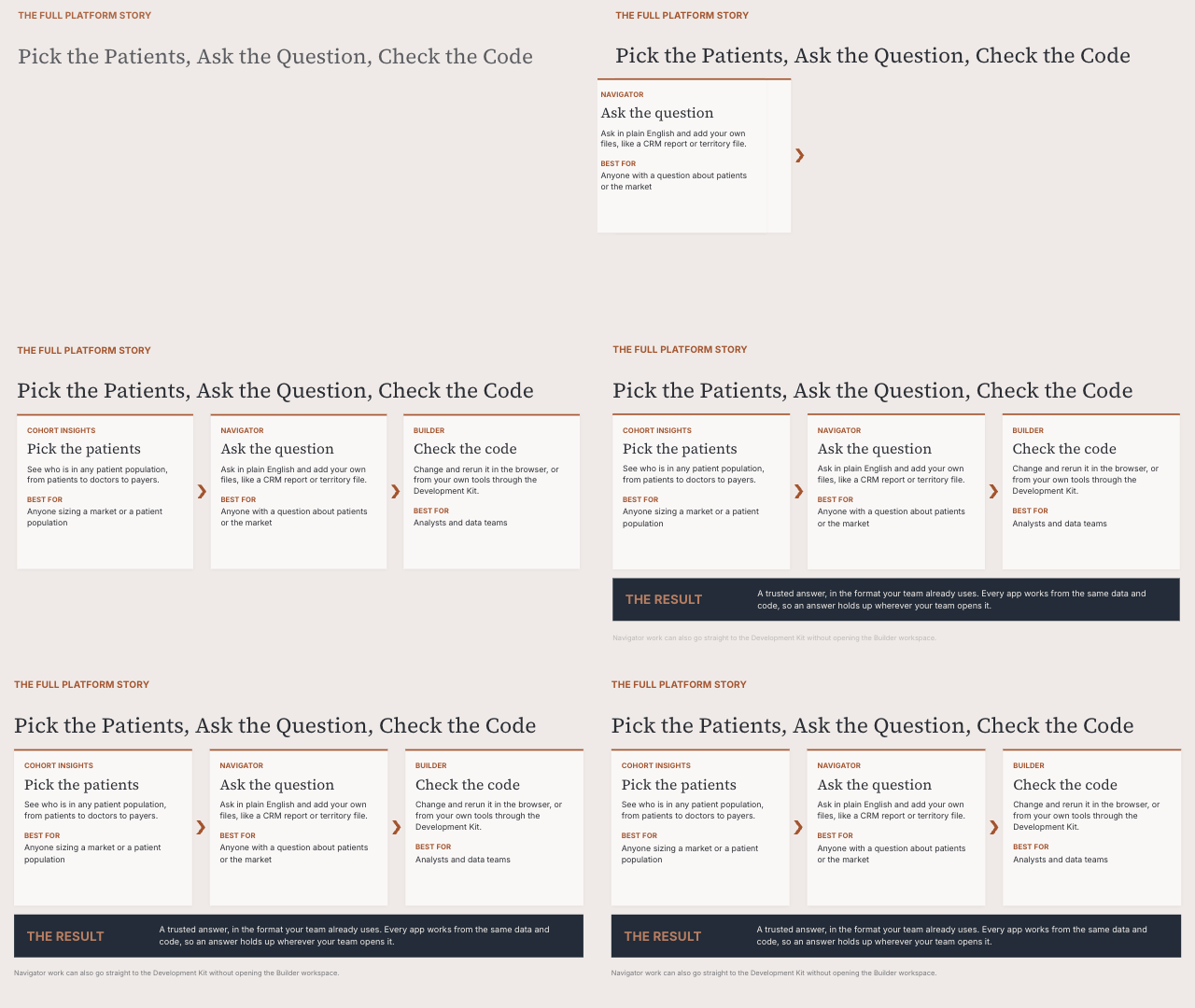
Three Ways to Work With Healthcare Data in Marmot
With this release, Marmot offers three complementary ways to explore healthcare data.
Cohort Insights: Start with a patient population and quickly explore ready-made reports and dashboards.
Marmot Navigator: Ask questions about patients, providers, treatments, or markets in plain English and explore the answers.
Marmot Builder: Open the underlying code, make changes, and rerun analyses to explore new questions.
You don’t have to choose just one.
A commercial user might start in Cohort Insights to understand a patient population, move to Navigator to ask more detailed questions, and then work with an analyst who uses Builder to refine the analysis.
Because all three applications run on the Marmot AI Platform and draw from the Komodo Healthcare Map®, they work together. Cohorts, definitions, and code sets can be saved in the Marmot Library and reused across applications and analyses.
No need to recreate work that’s already been done.
What the November 2026 Release Means for Life Sciences Teams
That’s what this release is really about. More answers. More control. Less waiting.
We’re making it easier for business users to answer their own questions while giving analysts the flexibility to dig deeper, test assumptions, and build on existing work. And we’re doing it without compromising the transparency and reproducibility that have been central to Marmot from day one.
Whether you want a report, a conversation with your data, or complete control over the code, Marmot offers a way of working that fits your needs.
To see what’s new in Marmot and how it can help your team, contact your Komodo account team.
FAQs
What Is Cohort Insights in Marmot?
Cohort Insights is a Marmot application that builds a patient cohort from a written description in seconds. It then generates a report on demographics, sites of care, payer mix, and treating healthcare professionals.
What Is Marmot Builder?
Marmot Builder lets technical users open the SQL, Python, or R code behind a Navigator analysis. Analysts can edit the code and rerun it inside Marmot. Previous versions are preserved.
What Is a Cohort Builder in Healthcare Analytics?
A cohort builder defines a group of patients who share criteria such as a condition or treatment. Cohort Insights in Marmot builds a cohort from a written description in seconds. It then reports on demographics, sites of care, and payer mix.
How Do HEOR Teams Use Real-World Data Analytics?
HEOR teams analyze real-world data to define patient populations and test study assumptions. Marmot Builder lets HEOR analysts change an enrollment window or comparator and rerun the analysis. Version history shows what changed and when.